I wrote a small C++ program that drives a clone PL2303 USB console cable directly through libusb, so it works on Windows without Prolific’s driver. This post covers why, how the cable is talked to, and what I want to do with this project in the future.
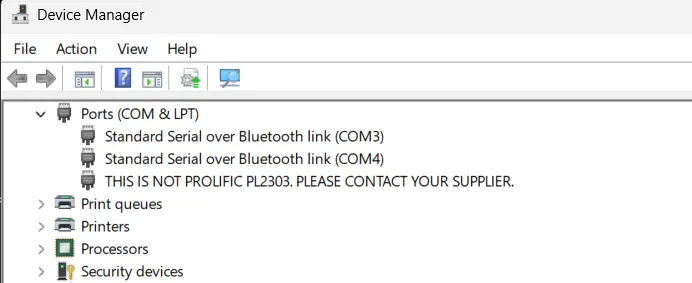
Table of contents
Open Table of contents
The Problem
A few months ago I was given a pair of USB serial console cables for free when I bought some networking equipment on Facebook Marketplace. After installing the Prolific PL2303 driver, I found out they were clones. Prolific makes this very obvious: Device Manager shows
THIS IS NOT PROLIFIC PL2303. PLEASE CONTACT YOUR SUPPLIER
and the COM port refuses to work.
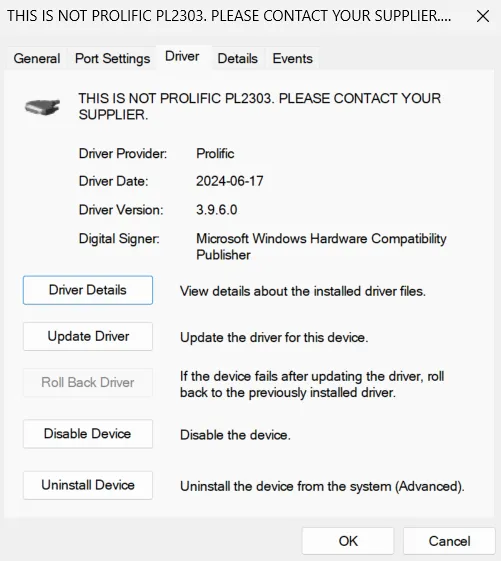
The exact driver I had installed at this time was Version: 3.9.6.0
Existing Work Arounds (and Why I Didn’t Like Them)
- Buy a new cable with a genuine PL2303 chip. This works, but throwing out an otherwise perfectly good cable feels wasteful.
- Install an older Prolific driver that doesn’t check whether the chip is genuine. This seems to be the most widely recommended fix online. You also have to stop Windows Update from replacing the driver. It works, but I didn’t want to depend on an end-of-life driver that will never be updated.
- Use Linux, or WSL with usbipd. For now the Linux
pl2303driver doesn’t seem to check whether the chip is genuine, so the cable works fine there. I wanted a native Windows tool, though as my primary OS is still Windows (For now).
Goals
The main goal is to get my “non-genuine” cables working on Windows without an old driver. For now I’m happy with a console session in a terminal window. Longer term, I want the program to be scriptable, to work with PuTTY, and eventually to act as a console server over SSH.
I only plan to use this with Cisco networking equipment, so that’s my focus.
Approach
My plan is to use Zadig to assign WinUSB as the cables driver rather than Prolific’s which will allow me to interface with the cable via a C++ program using the LibUSB library.
WinUSB via Zadig
Zadig can switch the cable’s driver from Prolific’s to Microsoft’s generic WinUSB driver. The cable then no longer shows up as a COM port, but any program can talk to it directly using libusb.
In my experience so far, the change has survived restarts and Windows Updates.
Zadig binds WinUSB to the cable’s USB ID (067B:2303), not to one physical cable. If you plug a genuine Prolific cable into the same PC, it will also get WinUSB and lose its COM port as well. For my use case (not owning any genuine Prolific cables) this is a perfectly acceptable tradeoff. In fact for my use case it is actually a feature as well, since both my non-genuine cables work interchangeably.
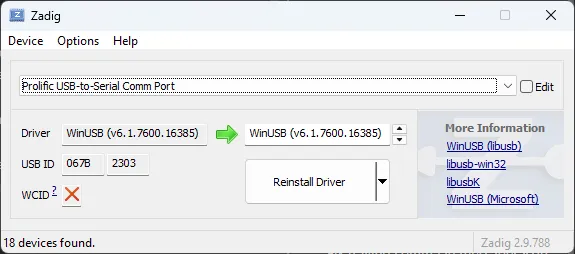 The above exmaple is after installing WinUSB via Zadig.
libusb
libusb is an open-source C library for talking to USB devices from a normal user program, with no kernel driver of your own. With the cable bound to WinUSB, libusb is how my program sends and receives data.
The Code
The program has two important parts:
pl2303_device.h/.cpp: aPl2303Deviceclass that handles everything about the cable.main.cpp: the console loop. Because all the USB details are in the class, it can be whatever it needs to be as I add features.
Everything is built using CMake.
The program also has two command-line options: --verbose prints every init step, and --help shows usage. More options are to come as the project grows.
Initializing the chip
The PL2303 needs a very particular series of vendor reads and writes before it will pass any data. I took the exact sequence from the pl2303_startup function in the Linux driver:
void Pl2303Device::runVendorInit() {
	// Values from Linux driver in drivers/usb/serial/pl2303.c in function pl2303_startup
	readVendor(0x8484);         //1
	writeVendor(0x0404, 0);     //2
	readVendor(0x8484);         //3
	readVendor(0x8383);         //4
	readVendor(0x8484);         //5
	writeVendor(0x0404, 1);     //6
	readVendor(0x8484);         //7
	readVendor(0x8383);         //8
	writeVendor(0x0000, 1);     //9
	writeVendor(0x0001, 0);     //10
	writeVendor(0x0002, 0x44);  //11
	// reset data pipes
	writeVendor(0x0008, 0);
	writeVendor(0x0009, 0);
}
What each step actually does isn’t documented. The Linux driver doesn’t explain it either: it’s simply the sequence that’s known to work. The good news is that my clone accepts the whole thing and its working.
After that, the constructor sets the serial line to the Cisco console default: 9600 baud, 8 data bits, no parity, 1 stop bit (8N1). As I mentioned I am only focusing on the Cisco devices in my lab currently, but later I plan to add command-line options to specify these parameters. It then turns on the DTR and RTS control lines.
Cleaning up
The constructor opens the device, claims its USB interface, and runs the init above. If any step fails, it releases everything it has acquired so far before reporting the error. The destructor releases everything too.
The class only exposes two things to the rest of the program: read() and write(). Everything else, such as the libusb handle and the init steps, is private. This greatly simplified writing main.cpp and will continue to do so as the feature set grows.
The console loop
Once the device is ready, main.cpp runs one loop:
- Read from the cable for up to 100 ms, and print whatever is read.
- Check whether any keys are waiting. If there are, send them to the cable.
- Repeat until quit key:
CTRL + ]
The loop checks whether a key is waiting using _kbhit() ). That way a single thread can handle both directions. Device output appears while you aren’t typing, and your keystrokes go out as soon as you press them. This gives me the exact type of responsiveness I expect from a console connection.
Other Keys
Windows reports arrow keys as two codes, and a Cisco console doesn’t understand them. So the program detects and translates them into the control characters Cisco IOS uses:
| Key | Sent as | Effect |
|---|---|---|
| Up | Ctrl+P | previous command |
| Down | Ctrl+N | next command |
| Left | Ctrl+B | cursor back |
| Right | Ctrl+F | cursor forward |
To quit, press Ctrl+], the same escape key that Telnet uses.
The Results
The full console works: boot output, login, show commands, ? help, Tab completion, pasting text, and command history. This is pretty much all I needed from this project, with it I am able to use my non-genuine cables with no loss in functionality.
Below is an example of the console output using the program:

Conclusion & Notes
I am very happy with how this small project turned out I now have two console cables that work rather than collecting dust or being recycled. I will say this was more of a fun exercise than anything since my Cisco switches already include a Mini-B USB console port so this was by no means a necessity. However this project has inspired me to start working on a Raspberry Pi powered console server and was a great learning opportunity.
What’s next
- Check if clone cable can send a serial break and impliment it for password recovery operations
- More command-line options (
--baud, and others) - Scriptable mode: pipe commands in, get output back
- A Telnet server so PuTTY can connect
- Console server features over SSH
Project Links
- Project repository: Coming Soon
- Zadig
- libusb
- Linux PL2303 driver source (
pl2303.c)